
I know today we know about the operating system of computer, if you are searching the computer related notes, then you have come on the right post. In this post, we are going to discuss an important part of the computer about the operating system in which you will get to read all the important notes related to it, which you can prepare for any upcoming exam.
Operating System in Computer
– Operating system is system software which is often called OS.
– OS makes the computer workable.
OS acts as an intermediary between the computer hardware and the user.
OS controls the hardware present on the computer.
OS helps in running all the programs that we use.
Without OS no computer can be run.
OS is such a systematic set of instructions that controls the entire activities of the computer.
OS can be considered as computer manager in a way.
An operating system is an essential software on a computer.
It provides a platform for application software.
Like – Microsoft Windows, Ms-Dos, Unix, Linux, Macos,

– Mobile OS:- Android, Windows, ios, etc.
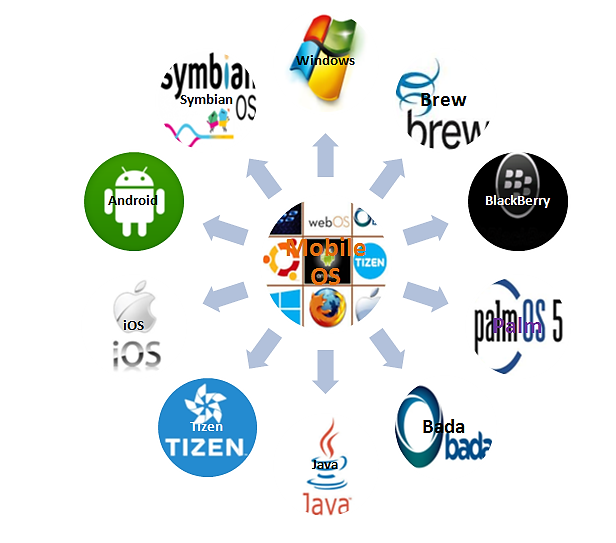
– Just as operating systems are used to operate computer systems, in the same way, various operating systems are used to operate smart phones, tablets, etc., which are as follows –
– Android – The first version of the Android mobile operating system, Android 1.0, was launched by the Google company in the year 2008. The latest version of Android, Android 13, was launched on August,2022.
The Android operating system is made by Google.
HTC Dream – was the first mobile phone to use Android.
– IOS- This is the operating system created by Apple company, its first version called Iphone OSI was launched in January, 2007. Its latest version is 16.2 which was launched in 2022.
– Win OS – Its first version made by Microsoft company was launched in 2010, its latest version is Win 10.
– Symbian – This operating system was created by the Symbian company in 1998, it is an open source software operating system used in mobile phones.
– Blackberry – It was published in 1999. This operating system is considered the most secure in terms of security. Its latest version was published in January 2013.
OS User Interface
1. CUI – Character User Interface
2. GUI – Graphical User Interface
– The medium through which communication is done between computer (machine) and human (user) is called interface. It is mainly of two types-
1. CUI – Character User Interface
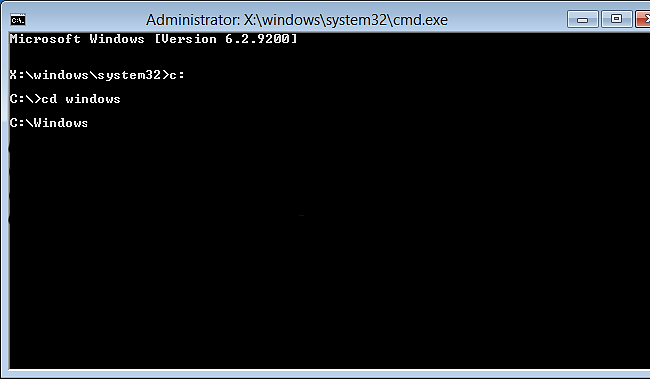
In this interface, work is done by giving commands through characters (letters and words), called character user interface.
This OS is also called command line interface where work is done by giving commands.
Ex. Unix, Ms Dos
UNIX Unix: – This is the CUI OS created in 1969 by Ken Thomas and Dennis Ritchie. It is a multiuser OS. In this OS, the functions of the CPU are directed by the kernel. The kernel is like the manager of the Unix OS.
UNIX – Uniplex information computer system
MS Dos – Microsoft Disk Operating system: – This is a CUI, OS in which work is done by giving commands.
2. GUI – Graphical User Interface
– Electronic devices are connected using graphics in this OS.
– Tasks can be easily done using the mouse from this OS.
– It is very easy to work in this OS, in which multimedia can also be used.
Ex. – Windows, Linux, Mac Os etc.
Windows- It was developed by Microsoft Company.
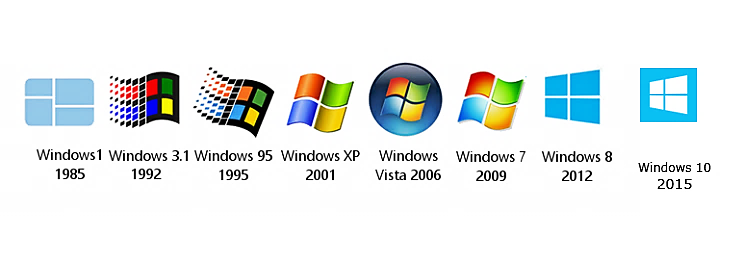
– It was released in 1985.
– Its first version was windows 1.0.
– Windows 1.0 – 1985
– Windows 2.03 – 1988
– Windows 3.0 – 1990
– Windows 05 – 1995
– Windows NT 4.0 – 1996
– Windows 98 – 1998
– Windows ME – 2000
– Windows XP – 2001
– Windows XP professional– 2005
– Vista – 2007
– Window 7 – 2009
– Window 8 – 2012
– Window – 10 – 2015
– Linux- We OS was developed in 1991 by Linus Torvalds. It is an open source operating system. It is a multiuser multitalking operating system. Its main parts are –
1. Kernel – This is the core of the Linux system which is loaded into memory as soon as the system starts and manages memory, files and peripheral devices.
2. Shell – It is a program that interprets the commands given by the user, these commands are typed on the line or kept in a file called shell script.
3. System Utility
4. System Library
– Mac os- Apple company created this GUI OS in 1984 named Macintosh OS.
– Operating System (OS) – It is the system software of the computer, which works for communication between the hardware, software and user present on the computer.
– There are two main interfaces of the operating system-
1. CUI – Character User Interface
2. GUI – Graphical User Interface
Main functions of Operating System
1. Memory Management –
The operating system keeps track of which part of the memory is currently being used by which process, and when the space in the main memory becomes empty, it is the job of the operating system to make space available for the next program.
2. File Management – Managing the files created on the computer. The file is saved in the computer’s memory, arranging it like creating and deleting files, creating and deleting folders, etc. Backing up files, renaming files, saving data in files, etc. are done by OS related to file management.
3. Process Management – Any type of process on the computer is managed by the OS. Job scheduling and task management is done by the OS.
4. Input Output Device Management – Co-ordinates the input and output devices connected to the computer and also assigns tasks to them. The management of the devices connected to the computer is done by the OS itself.
5. Communication – The work of communication between computer hardware, software and human and machine is also done by the operating system.
6. Security – Security of computer and computer network is provided by the Operating System. Utility software and techniques are also used by the OS. So that damage to the computer can be avoided.
– Features and types of Operating System
Types of Operating System
(1) Single User Operating System- In this type of operating system only one person can work at a time. The PCs we use generally support single user operating systems. Like – Windows etc.
(2) Multiuser Operating System – In this OS, more than one person can work simultaneously at a time. This OS processes all the devices in an orderly manner. Like – Unix etc.
(3) Multitasking OS – This OS can do more than one task at a time, hence it is called multitasking OS. In this OS, one task can be easily changed from one task to another. Like – Unix, Linux, Windows etc.
(4) Multiprocessing Operating System Multi Processing OS – In this OS, more than one CPU can be used or more than one processor can be used simultaneously, hence it is called multi processing OS. Like – Linux, Unix etc.
(5) Batch Processing Operating System Batch Processing OS – The general meaning of batch is group, in this OS more than one similar task is performed by this operating system as a batch. User intervention is negligible in this OS. Like- using parole system in an institution.
(6) Real Time Operating System- Real time OS is used for real time application i.e. for such application where the processing of data is completed in a fixed and very short time. It shows the work and time to be done in real time. It uses priority to execute OS process. These OS are very fast and respond in real time. They are used in nuclear power plants, fuel systems, etc.
(7) Time Sharing Operating System – In this OS, a fix time is given to execute each process. Tasks are easily switched in this OS.
In this OS, more than one process and more than one user can use computer resources simultaneously. In this OS, CPU is given a time to perform each task, which is also called time slice or quantum time. Like – Mac Os etc.
(8) Distributed OS – When many computers are interconnected through a network and share tasks with each other, it is called a distributed OS. Eg: – Flight Server System Peer to peer system.
Operating System Programs
– System Calls – System calls service the operating system for user actions through the application program interface. In computing, a system call is a programmatic method by which a computer program requests a service from the operating system’s kernel, ie a system call is the method a program uses to communicate with the operating system.
– POST – Power on Self Test
As soon as the computer starts, it first checks itself, this process is called Post.
– Booting – The process of loading the OS from Secondary Memory to Primary Memory is called Booting.
1.Cold Booting – The initial booting of the computer is called cold booting.
2. Warm Booting – The booting that occurs when the computer is restarted is called warm booting.
– Important Features of Windows 10 –
Cortana– PDA
– This Personal Digital Assistant is a Personal Digital Assistant.
– Helps to find and organize stored files.
– Reminds information/notices.
– Reminds you of the appointments you have forgotten.
Windows Defender – It is an anti virus program that prevents viruses from entering the computer. This is an Anti Malware Program that runs automatically in the background. Checks for files to be opened by the user.
This is Real time Antivirus. It displays the information “Windows Defender is taking action to clean detected malware” or “Detected threats are being cleaned”.
Snap Assist – It works to show 4 windows on one screen. Helps to run multiple programs on the same screen at the same time.
Screen Cast – Using MirraCast technology by Microsoft, the screen of our computer can be displayed on another computer. Also known as remote login.
Windows Hello – It is a method of password/identification in which we can login to the computer by touch or sight and by providing the password. For example, it identifies an individual using face scan, finger print, iris scan, etc.
Wifi – Wireless fidelity – In this, the device is connected to the network using radio signals.
Wifi Sense – This is a feature in Windows 10 through which you can connect to Wifi networks, which have been connected before.
Lifi – Light Fidelity In this, data and information are transmitted through the light part of the electromagnetic spectrum. It works faster than Wifi.
Hotspot Hotspot – Hotspot is an access point Physical Location / location to which other devices are added or connected to that location like – using hotspot in mobile.
- Speedy Current Affairs November 2025 Pdf Free Download
- Africa Continent, Major Countries, Straits and Lakes
- Asia continent, Major countries, Jalasandhi and Lakes
- Vision Ias Today Current Affairs 10 May 2025
- Vision Ias Today Current Affairs 8 May 2025
Note : If you are preparing for UPSC, SSC or any other exam then definitely join us.
2 thoughts on “Operating System in Computer Notes”